|
Kingvac operating instructions Volvo FM2 |
|
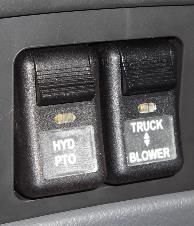
Vacuum Engage
1. Gear in NEUTRAL 2. Park brake ON 3. Foot on foot brake 4. Select BLOWER mode on the Truck/Blower switch 5. Hold minus button on shifter and select M (manual) 6. Use plus button on shifter to select 6th gear 7. Engine will rev to 1400rpm 8. Use plus button on shifter to select desired speed 9. Release foot brake 10. Exit cab and operate from rear
Vacuum Disengage 1. Push rear vacuum release button to equalize pressure in tank 2. Push foot brake and move gear to neutral - Do not downshift gears 3. Deactivate vacuum by selecting TRUCK mode on the Truck/Blower switch
Hydraulics Use hydraulics for Debris tank raise/lower, Debris door open/close, bag house lid open/close, Boom movement and HP water 1. Gear in NEUTRAL 2. Park brake ON 3. Press HYD switch to engage/disengage 4. Select N1 (HPW low) or N2 (HPW high)
Hydraulics can be used together with the vacuum but must be engaged at the same time |
|
1 |
|
2 |
|
4 |
|
5 |
|
6 |
|
7 |
|
8 |
|
9 |
|
2 |
|
3 |
|
3 |
|
3 |